
Picrew PFP & OC Maker
TETRACHROMA INC.Art & Design
4.41.51K Reviews
- Version
- 2.0.7
- Installs
- 1.00M
- Age Rating
- Teen
Screenshots
Our Review of Picrew PFP & OC Maker
 Analysis by Appyee
I came to Picrew PFP & OC Maker looking for a quick way to make a profile image, but the appeal is broader than a single finished picture. It is an art-and-design app for building character portraits from illustrated parts, so the fun is in trying combinations and shaping a look that feels like yours. I would think of it less as a drawing program and more as a collection of artist-made character tools: you choose a style, make choices within it, and see how those choices change the result.
That distinction matters when deciding whether to install it. If you want a distinctive avatar without having to draw one from scratch, it gives you a low-pressure place to experiment. If you need complete control over every line, a layered illustration app is still a better fit. For me, its strongest use is turning a vague idea—“something cozy,” “a character for this chat,” or “a new online persona”—into a finished image through small, enjoyable decisions.
Making a character in the app today
I’d begin this section by treating the first template choice as the main creative decision: it sets the portrait’s visual language before I start adjusting details. I’ll also cover a practical way to keep the finished character readable at profile-picture size, so the process stays focused on the image I actually want to use.
A quick start, with a choice of artistic styles
Hey there! So, I recently stumbled upon this app called Picrew PFP & OC Maker, and I have to say, it's quite the creative playground for those of us who love personalizing our online avatars. Whether you're into crafting the perfect profile picture or designing your own original characters, this app has got you covered.
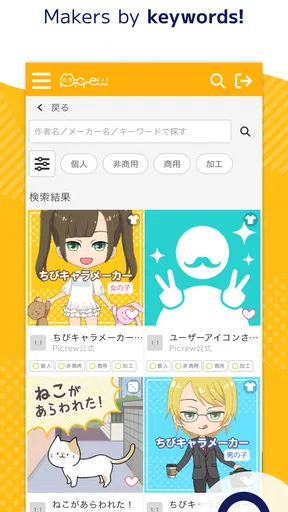
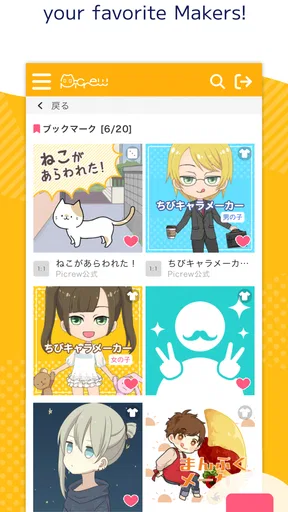
First off, let's talk about how easy it is to dive into Picrew PFP & OC Maker. Once you download the app, you're greeted with a super intuitive interface. No need to be a tech wizard here; everything's laid out in a way that just makes sense. You can start by choosing from a wide range of templates created by different artists. The variety is pretty impressive, from cute chibi styles to more detailed and realistic designs.
The template choice is also the first real decision about the finished image. A design that feels right for a playful profile picture may not suit a character you want to reuse in a story or roleplay, and different artists’ visual styles can give similar ideas very different moods. I’d start by browsing for the overall look I want, rather than picking the first template and trying to force it into a different style later. That saves time and makes the customization feel more intentional.
For a practical everyday example, imagine changing your profile picture to mark a new hobby or a seasonal mood. I’d choose a template whose style already fits, make a few focused changes, then compare the result at the small size where most people will see it. Tiny details can disappear in a cropped avatar, so a clear silhouette, expression, and color combination can matter more than adding every possible accessory. That quick check is a useful final step before sharing.
Customization works best with a clear idea
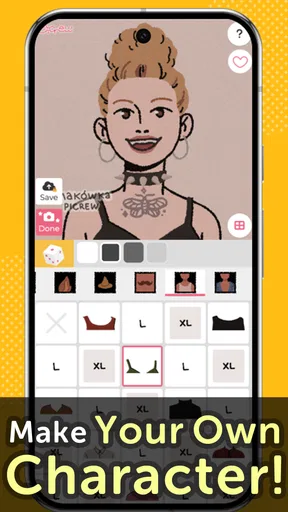
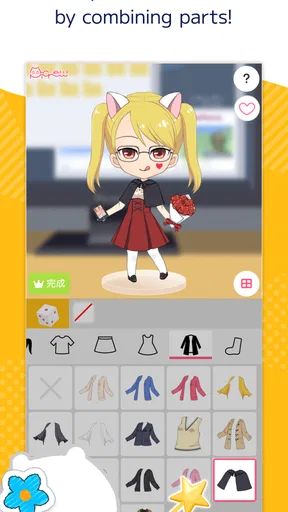
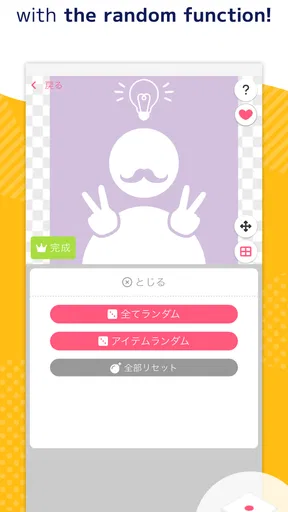
Now, onto the fun part—customization! This app offers a plethora of options for tweaking your character's appearance. You can play around with hairstyles, facial expressions, clothing, and even accessories. It's like having a digital dress-up game where you have full control over every little detail. I spent quite a bit of time just mixing and matching styles to see what I could come up with.
What's cool is that you can layer different elements to create something totally unique. Want to add a funky hat or switch up the background? Go for it! The app's flexibility lets your imagination run wild. And for those of us who love a good challenge, trying to create characters from our favorite shows or entirely new personas can be incredibly rewarding.
My useful tip is to treat each pass as a small design decision rather than changing everything at once. I’d settle on the general mood first, then adjust the face and hair, and finish with clothing and accessories. If the portrait starts to feel cluttered, removing one decorative element can make the character read more clearly. That restraint is especially helpful when you want a recognizable profile picture rather than a busy full-scene illustration.
There is a trade-off here: the menu of choices makes experimentation satisfying, but the result remains tied to the template’s available parts and the artist’s style. You are arranging and combining choices, not sketching custom shapes or freely editing every detail. That makes the app approachable for someone who does not draw, while also setting a ceiling for artists who want exact proportions, bespoke poses, or a fully original composition.
For an original character, I’d use the maker to establish a visual reference rather than expecting it to become a complete character-design studio. A consistent hairstyle, expression, and outfit can help you remember the character’s look while writing or planning a story. If you need several views, precise anatomy, or a design that must match across many scenes, you may want to take the portrait idea into a dedicated drawing tool afterward.
Community styles and sharing choices
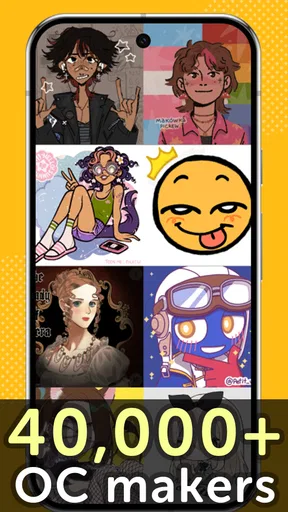
One of the standout features of Picrew is its community-driven content. The app allows artists to upload their own templates, which means there's a constant influx of new styles to explore. If you're an artist yourself, you can even contribute your own designs and share them with others. It's a vibrant ecosystem where creativity thrives, and I love seeing what other users come up with.
Plus, you can save your creations and share them directly from the app to your social media accounts. It's a great way to showcase your creativity and maybe even spark some inspiration in others. The community aspect really adds an extra layer of fun to the whole experience.
The artist-made approach changes how I’d use it compared with a general avatar editor. Those tools often aim for one coherent catalog and a predictable look; here, the attraction is moving between distinct creator styles. That variety can make the result feel less generic, but it also means the available choices may differ from one template to another. I wouldn’t assume every style offers the same kinds of options, so I’d pick a template for its overall feel before counting on a specific detail being editable.
If you plan to post a creation, I’d treat the share step as part of the workflow, not an afterthought. Check that the crop still reads well as a small icon, and consider whether the image is meant for a public profile or just for your own reference. The app’s social sharing is convenient, but a character portrait can also be a private mood board, a placeholder image, or a visual note for a project. It does not need to become a public post to be useful.
Artists may enjoy browsing how other people approach character-making, but the app’s appeal is not the same as a full illustration community built around critique or collaboration. I’d use the templates as inspiration and a playful way to explore styles, while looking elsewhere if the main goal is a structured portfolio, detailed feedback, or professional art production. That difference helps set sensible expectations for what the community element adds.
Who will get the most from it
Now, if you're wondering whether this app is for you, let me break it down. If you love customizing avatars or are looking for a fun way to express yourself online, then Picrew PFP & OC Maker is definitely worth checking out. It's not just about making pretty pictures; it's about crafting something that's uniquely yours.
With its user-friendly interface and endless customization options, the app is perfect for both casual users and those who take their avatar-making seriously. Whether you're a seasoned artist or just someone looking to add a personal touch to your online presence, Picrew makes it easy and enjoyable.
I think it suits people who enjoy visual tinkering, want a character image without learning a drawing app, or need a quick starting point for an original persona. It can also be a nice low-stakes activity when you have a few minutes: try a different style, make a portrait for a group chat, or create a character that reflects a current interest. The process is more about choosing and refining than technical skill, which makes it welcoming for beginners.
It is less suitable if you want realistic photo editing, a precise likeness, or complete freedom to paint and revise. It may also frustrate anyone who prefers one unified set of tools, because artist-made templates are inherently individual rather than identical editors with interchangeable parts. For those needs, I’d choose a conventional drawing or photo-editing app instead of expecting this one to replace it.
There is also a useful middle ground for people who already draw. You can use a finished maker portrait as a quick reference for a color palette or outfit idea, then redraw and develop it elsewhere. I would not treat the generated image as a substitute for your own finished artwork, but it can help you make a decision when you are stuck between several character directions.
Version, value, and what to keep in mind
The current release is version 1.2.11, and the app first arrived on July 11, 2024. Those details give a simple point of reference for its present state, rather than a reason to assume every template or behavior has changed over time. The developer is TETRACHROMA INC. I’d judge it by the experience it offers now: a mobile space for trying artist-created character styles and saving a portrait, rather than by expectations of a large drawing suite.
It is free to download, with in-app purchases ranging from $1.99 to $39.99 per item. That makes it easy to try before deciding whether the available experience is enough for you. I’d explore the styles and work out what you actually want to make before spending money; a purchase only makes sense if it supports the particular creative use you have in mind. The app is rated Teen, so it is worth keeping that age guidance in mind when choosing it for a younger user.
Its audience is substantial: it has more than a million installs, with an average rating of 4.3 from around 35,000 ratings and about 1,300 written reviews. I read that as a sign that the format has found plenty of fans, not a guarantee that every template will suit every person. The best test is whether you enjoy choosing between the art styles and can find one that matches the image you have in mind.
One question people often have is whether they need art experience. I don’t think so: the central activity is selecting and combining the choices a template provides, so a beginner can make a portrait without knowing how to draw. The more useful question is whether that kind of guided creativity is what you enjoy. If you want to invent every visual element yourself, the template-based approach will feel restrictive rather than helpful.
Another practical consideration is how you want to use the finished image. For a profile picture, I’d favor a clear face and a simple composition; for an original-character reference, I’d focus on a look that communicates personality. Saving and sharing are part of the experience, but the image can serve a purpose even if you never post it. Thinking about the destination first helps keep the design choices focused.
As the app continues to evolve, I’d watch whether its current version makes browsing and returning to preferred styles feel smooth, and whether the range of artist-made templates stays compelling for the kinds of characters I want to create. Those are the changes that would matter most to me as an existing user. I would not assume a particular future feature; I’d simply look for improvements that make it easier to find a fitting style and finish a portrait without losing the relaxed, playful feel.
A creative tool with a clear boundary
In conclusion, Picrew PFP & OC Maker is a gem of an app for anyone who loves creativity and personalization. It's a space where you can let your imagination soar without any limitations. So, go ahead and give it a try—you might just find yourself getting lost in the world of digital character creation.
Whether you're crafting a new persona or designing a fun avatar for your socials, Picrew is there to make the process enjoyable and fulfilling. So, what are you waiting for? Dive in and start creating!
My more measured recommendation is to try it when you want an expressive portrait quickly and enjoy browsing different artists’ approaches. It is a particularly good fit for casual profile-picture making and early character ideas, but not for detailed illustration, exact likenesses, or a design that demands unrestricted editing. That boundary is not a flaw so much as the trade-off behind its approachable format: you give up some control in exchange for a simple, style-led way to make something personal.
Privacy and Permissions
See what permissions an app requests and how it handles your data.
- Phone
- read phone status and identity
- Photos/Media/Files
- read the contents of your USB storage, modify or delete the contents of your USB storage
- Storage
- read the contents of your USB storage, modify or delete the contents of your USB storage
- Wi-Fi connection information
- view Wi-Fi connections
- Device ID & call information
- read phone status and identity
- Other
- view network connections, measure app storage space, full network access, control vibration, prevent device from sleeping, Google Play license check, read Google service configuration
Verdict
Strengths of Picrew PFP & OC Maker
- Wide variety of customization options.
- User-friendly interface for easy use.
- Regular updates with new features.
- No account needed to create avatars.
- Free to use with no hidden fees.
Limitations of Picrew PFP & OC Maker
- Limited export resolution options.
- Occasional lag in loading assets.
- No offline mode available.
- Some features require internet access.
- Limited language support.
Similar Picks in This Category
View All
Canva: AI Photo & Video Editor
Canva4.8

PENUP – Drawing-sharing SNS
Samsung Electronics Co., Ltd.4.5

Crafto
Kutumb App4.6

Sketchbook
Sketchbook4.1

ibis Paint X
ibis inc.4.5

Adobe Express: AI Photo, Video
Adobe4.6
Frequently Asked Questions
What is Picrew PFP & OC Maker?
Picrew PFP & OC Maker is a versatile avatar creation app that allows users to design personalized profile pictures and original characters. Featuring a wide array of customizable options, this app caters to users seeking unique and creative avatars for social media or personal projects.
Is Picrew PFP & OC Maker free to use?
Yes, Picrew PFP & OC Maker is free to use. While the app offers a wide range of free features and customization options, some additional content or premium features may require in-app purchases. Users can enjoy creating avatars without any cost, but optional enhancements are available.
What customization options are available in Picrew PFP & OC Maker?
Picrew PFP & OC Maker offers an extensive range of customization options, including hairstyles, facial features, clothing, accessories, and more. Users can mix and match elements to create a truly unique avatar, with various color palettes and styles to suit different tastes and preferences.
Can I share my creations from Picrew PFP & OC Maker on social media?
Yes, Picrew PFP & OC Maker allows users to easily share their creations on social media platforms. The app provides seamless sharing options, enabling users to showcase their avatars directly to platforms like Instagram, Facebook, and Twitter, or save them to their device for later use.
Is Picrew PFP & OC Maker suitable for all ages?
Picrew PFP & OC Maker is designed to be user-friendly and suitable for a wide range of ages. However, parents should be aware that some customization options may include mature themes. It's advisable to review the app's content and settings to ensure they align with the intended user's age group.
